Ridiculously Responsive Social Sharing Buttons is a plugin for Joomla
The joomlarrssb plugin adds social sharing buttons and Open Graph metadata tags to com_content items. It is an official Joomla Project plugin, originally built for the joomla.org website network, and fully compatible with Joomla 4.x, 5.x, and the newly released Joomla 6. It places clean, responsive sharing buttons on your content pages and — perhaps more valuably — automatically generates Open Graph tags for every article on your site.
TL:DR – Once built and uploaded, this just works. The Open Graph tag generation is reason enough to install it.
Contents
Social Sharing Buttons for Joomla
The plugin generates a set of lightweight, responsive sharing buttons that sit neatly within your article layout. The button set has been updated to reflect the current social landscape: Twitter/X, Facebook, LinkedIn, and others can each be toggled on or off from the plugin options. Given how fragmented the social sharing space has become by 2026, that per-button control is genuinely useful.

Open Graph Tags for Joomla
The plugin automatically writes Open Graph tags into the <head> of every content page — og:title, og:type, og:image, and og:url — with no manual intervention required. This matters more than ever in 2026: platforms including LinkedIn, WhatsApp, Threads, and Bluesky all rely on Open Graph data to generate rich link previews. Without these tags, shared links appear as bare URLs with no image or description, which dramatically reduces click-through.
If you view the source of a page running this plugin, you will see something like this in the <head> section:
<meta property="og:image" content="https://www.example.com/images/joomlarrssb.png">
<meta property="og:description" content="Ridiculously Responsive Social Sharing Buttons for Joomla. This Joomla! plugin adds social sharing buttons and metadata optimized for Open Graph to com_content items.">
<meta property="og:title" content="Ridiculously Responsive Social Sharing Buttons for Joomla">
<meta property="og:type" content="article">
<meta property="og:url" content="https://www.example.com/cms/joomlarrssb.html">
Configuration is minimal. Clone the repository, build it locally, install and enable the plugin — and it handles the rest. The Open Graph tags alone make this worth installing on any Joomla site that publishes content intended to be shared.
Instructions
Try to install it directly from within Joomla!

Clone and build the plugin
At the time of writing, plugin was not installable via the Joomla web installer without a build step — attempting to upload the raw repository zip returns a manifest error. The process below works reliably on macOS and Linux, and on Windows via WSL.
- Clone the repository from GitHub:
git clone https://github.com/joomla-projects/plg_content_joomlarrssb.git - If you are on macOS, install coreutils via Homebrew so you have access to the GNU
sha512sumcommand:brew install coreutils. If Homebrew is not yet installed, visit brew.sh first. - On Linux,
sha512sumis available natively — no extra step needed. - Build the plugin: navigate into the build directory with cd plg_content_joomlarrssb/build and run ./build.sh
- The build script produces a installable zip file in the project root. Install it in Joomla via System → Install → Upload Package File and select that zip.

Screenshot: Uploading the Ridiculously Responsive Social Sharing Buttons for Joomla plugin
Joomla 6 compatibility
With Joomla 6 now released, the plugin's compatibility story is straightforward: the core architecture of com_content and the plugin event system remain consistent across Joomla 4, 5, and 6, so the plugin installs and runs without modification on all three. If you are migrating an existing site to Joomla 6, the plugin will carry across cleanly through the standard migration process. It is worth re-checking your Open Graph image dimensions after migration, since Joomla 6 introduces updated image handling that may affect how the og:image URL is constructed.
Enable the plugin
- After installation, navigate to System → Manage → Plugins, search for joomlarrssb, select it, and click Enable.
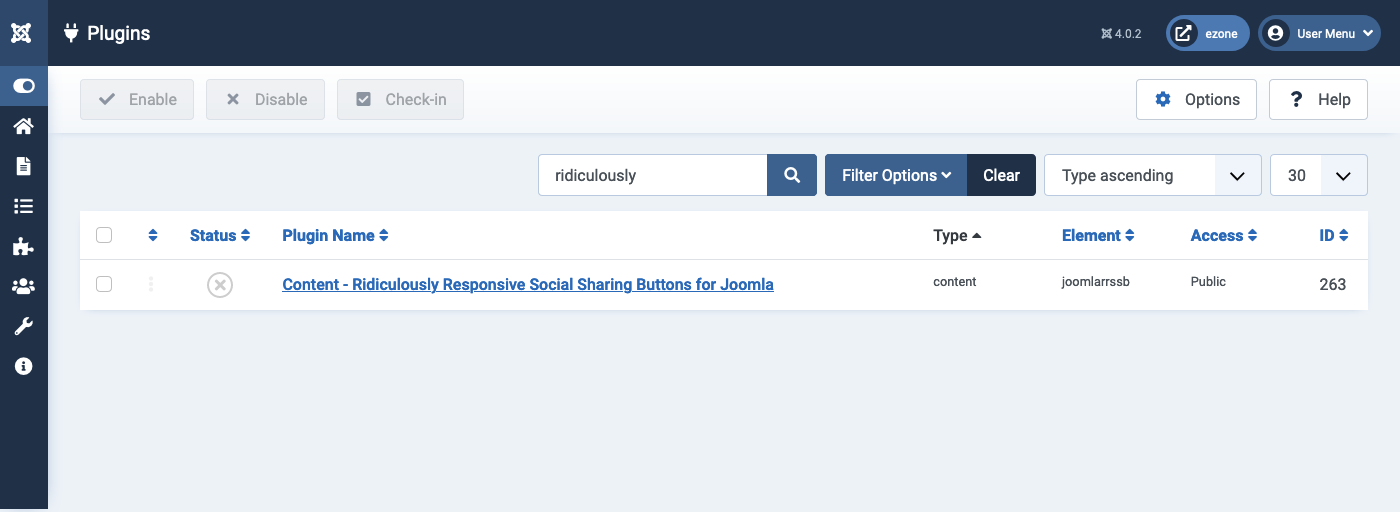
Screenshot: Enabling the Ridiculously Responsive Social Sharing Buttons for Joomla plugin
Display Options
-
The plugin options let you control which sharing buttons appear. Given the shifts in the social media landscape — X (formerly Twitter) has a reduced organic reach for many publishers, while LinkedIn and Threads have grown in relevance — it is worth reviewing this list and enabling only the platforms that make sense for your audience.

Screenshot: Display Options for the Ridiculously Responsive Social Sharing Buttons for Joomla plugin
A note on Open Graph images
For best results across all platforms in 2026, ensure your articles have a featured image set. The plugin will use the article's image to populate og:image automatically. The widely recommended safe dimensions remain 1200×630 pixels — large enough for high-density displays, with a 1.91:1 ratio that renders well on Facebook, LinkedIn, WhatsApp, and Bluesky without cropping. If no article image is present, the plugin falls back to a site-level default, which you can configure in the plugin options.