

Android 17 Features: What Mobile Developers and IT Managers Need to Know
Introduction
Android 17 is rolling out now, beginning with Pixel devices, with broader availability to other eligible Android devices expected throughout 2026. The release brings meaningful changes across productivity, gaming, security, and core platform behavior. For mobile developers and IT managers, Android 17 is not simply a feature update. It introduces behavioral changes and new enforcement rules that require attention and, in some cases, immediate action.
TL:DR – This article breaks down the most important Android 17 features and explains why each one matters to your work.
Contents
- Android 17 Features: What Mobile Developers and IT Managers Need to Know
- Introduction
- Productivity
- Bubbles
- Screen Reactions
- Foldable Gaming Mode
- Security Protections and Stricter Enforcement
- Android Advanced Protection Mode (AAPM)
- Post-Quantum Cryptography (PQC) APK Signing
- Certificate Transparency Enabled by Default
- Block Cross-Profile Loopback Traffic
- Per-App Keystore Limits
- Restrict Implicit URI Grants
- Safer Native Dynamic Code Loading (DCL)
- Restrict PII Fields in Contacts Provider 2 (CP2)
- Enforce Strict SQL Checks in CP2
- Core Platform
- Memory Limits, Performance, and Behavior Changes
- Memory Restrictions for Notification Custom Views
- Static Final Fields Are Now Unmodifiable
- New Lock-Free Implementation of MessageQueue
- New NPU Feature Flag Requirement
- usesClearTraffic Deprecation Notice
- Gemini Intelligence coming later in 2026
- Summary of Key Android 17 Changes for Developers and IT Managers
- Conclusion
Productivity
Bubbles
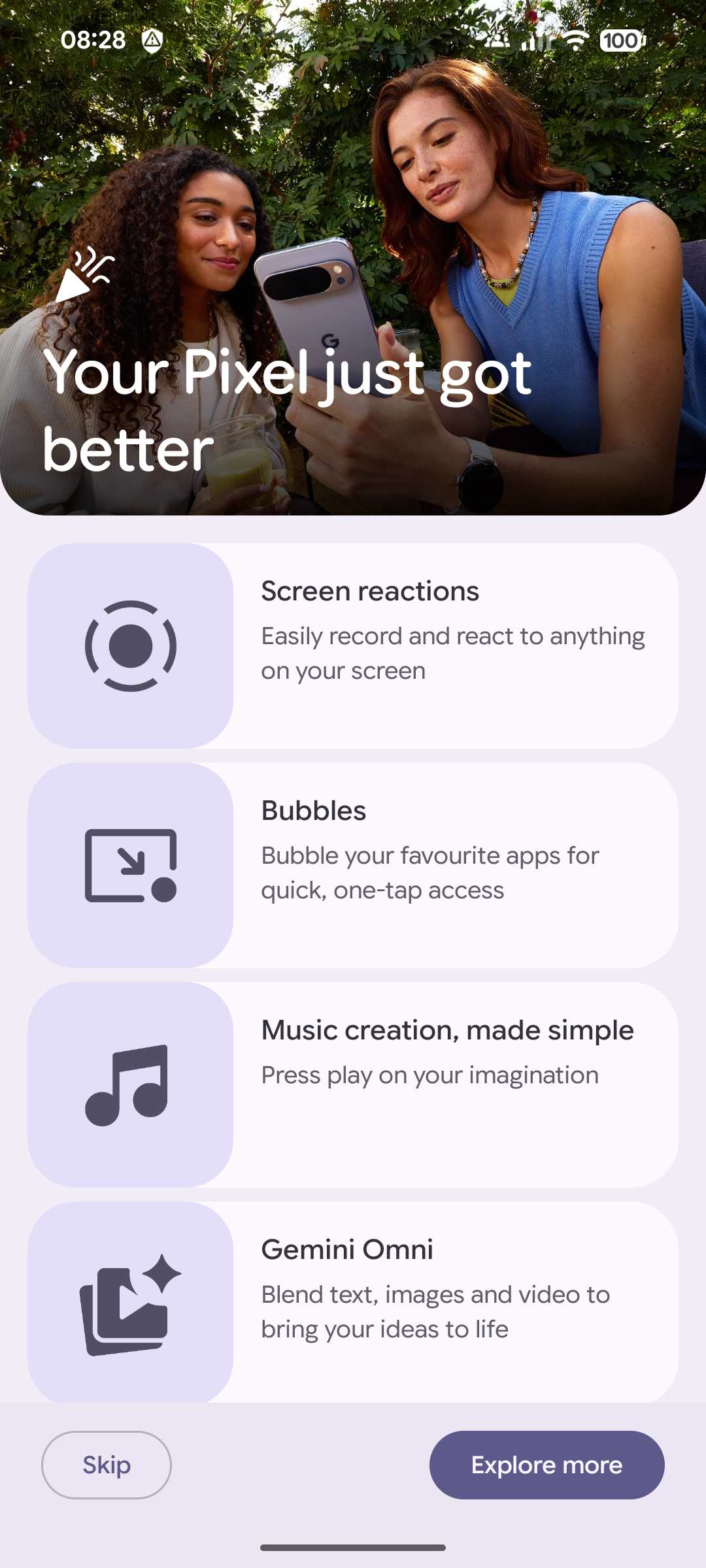
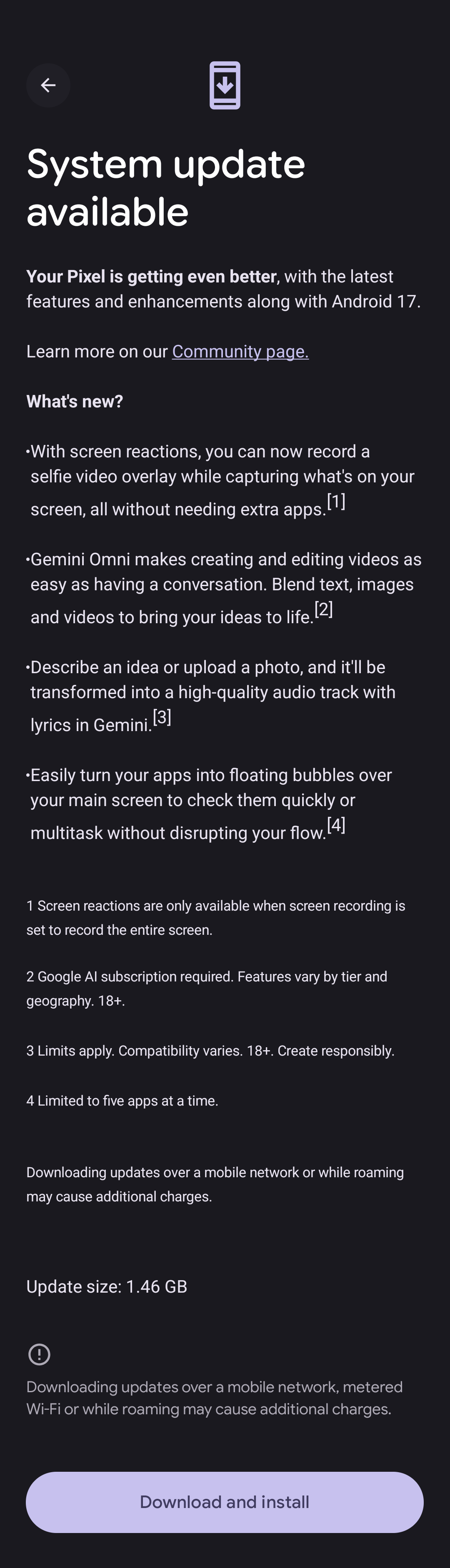
One of the most visible user-facing features in Android 17 is Bubbles. This capability allows users to convert any app into a compact, floating window that sits on top of other apps. Users can long-press any app icon to trigger this behavior.
On large-screen devices, Bubbles are docked in a dedicated bubble bar at the bottom of the screen. From there, users can switch between floating apps with a single tap, or resize and maximize them to full screen.
Why it matters for developers: If your app is not optimized for windowed or floating display modes, users may encounter layout issues or broken UI elements when running your app as a Bubble. Developers should test their apps in this context, particularly those targeting productivity, reference, or communication use cases.
Why it matters for IT managers: Bubbles increases the likelihood that employees will run multiple apps simultaneously, including personal apps alongside enterprise tools. Mobile device management (MDM) policies may need to be reviewed to account for this expanded multitasking behavior.
Screen Reactions
Android 17 updates screen recording with a new toolbar and an improved recording flow. The new Screen Reactions feature allows users to record themselves using the device's selfie camera while simultaneously capturing the phone screen. No green screen or third-party app switching is required.
Why it matters for developers: Apps that interact with the screen recording pipeline or camera stack should be tested against the new toolbar and dual-capture behavior to ensure compatibility. Apps that previously relied on workarounds for simultaneous camera and screen capture may find that the platform now handles this natively.
Why it matters for IT managers: Screen Reactions lowers the barrier for employees to record and share device screens, including potentially sensitive content. Organizations should review data loss prevention (DLP) policies to address this new capability.
Foldable Gaming Mode
Android 17 introduces a dedicated foldable gaming mode designed to make better use of the expanded screen real estate on foldable devices. The mode features an optimized 50/50 layout, with the game view occupying the top half of the screen and a dynamic gamepad occupying the bottom half.
Why it matters for developers: Game developers targeting foldable devices should evaluate how their titles render in this new 50/50 layout. The dynamic gamepad area introduces a new interaction surface that game engines and input handling code may need to explicitly support.
Why it matters for IT managers: While gaming may seem outside the enterprise scope, foldable devices are increasingly common in professional environments. Understanding how Android 17 changes the behavior of these devices helps inform device procurement and policy decisions.
Security Protections and Stricter Enforcement
Security is a major focus of Android 17, with changes affecting both end users and developers. Several of these changes are enforced at the platform level and will affect all apps, regardless of their target API level.
Android Advanced Protection Mode (AAPM)
Android 17 introduces Android Advanced Protection Mode, which offers users a powerful new set of security features. This is a new API surface that developers and IT managers should be aware of, particularly for enterprise and high-security deployments.
Note: Specific technical details of AAPM beyond what is documented in the Android Developer summary were not confirmed across multiple sources at the time of writing. IT managers should consult the official Android 17 developer documentation for the full scope of AAPM capabilities.
Post-Quantum Cryptography (PQC) APK Signing
Android 17 adds support for APKs to be signed with post-quantum cryptographic (PQC) signing keys. This is a forward-looking security measure designed to protect app integrity against future cryptographic threats.
Why it matters for developers: While PQC signing is not yet mandatory, developers should begin evaluating their signing pipelines for compatibility. Early adoption positions apps to meet future security requirements before they become enforced.
Why it matters for IT managers: Organizations that manage internal app distribution should discuss PQC signing readiness with their development teams. Enterprise apps distributed via MDM solutions should be evaluated for compatibility with PQC-signed packages.
Certificate Transparency Enabled by Default
In Android 16, Certificate Transparency (CT) was available as an opt-in feature. In Android 17, CT is planned to be enabled by default for all TLS connections performed by the device.
Why it matters for developers: Any app that makes TLS connections must ensure that the certificates it relies on are logged in a CT-compliant log. Apps using private or internal certificates that are not CT-logged may experience connection failures. This is a breaking change for apps that have not already tested against CT enforcement.
Why it matters for IT managers: Internal enterprise services that use privately issued TLS certificates should be audited immediately. Certificates that are not included in publicly recognized CT logs will cause connection failures for apps targeting Android 17 or higher.
Block Cross-Profile Loopback Traffic
Cross-profile loopback traffic is no longer permitted by default in Android 17. This change affects all apps, regardless of their target API level.
Why it matters for IT managers: This is a significant change for enterprises running work profile configurations. Apps or services that previously relied on loopback communication between personal and work profiles will stop functioning. IT teams should audit their app portfolio and MDM configurations before deploying Android 17 to managed devices.
Per-App Keystore Limits
Android 17 introduces limits on the number of keystore keys an app can create, based on its target API level. Attempting to create more keys than the limit allows will cause an exception.
Why it matters for developers: Apps that generate keystore keys dynamically, such as those handling per-user encryption or certificate management, should audit their key creation logic. Exceeding the new limits will result in runtime crashes.
Restrict Implicit URI Grants
Android 17 recommends, and in some cases enforces, that apps explicitly preallocate all necessary URI permissions when initiating intents, rather than relying on the system to grant them automatically.
Why it matters for developers: Apps that share content via implicit URI intents should be updated to explicitly declare the required permissions. Failure to do so may result in permission denials or intent failures on Android 17 devices.
Safer Native Dynamic Code Loading (DCL)
For apps targeting Android 17 or higher, native DCL modules must ensure they cannot be overwritten without detection. This change closes a class of vulnerabilities related to code injection via dynamically loaded native libraries.
Why it matters for developers: Apps using native libraries loaded at runtime should review their implementation against the new DCL requirements. Non-compliant implementations will be flagged or blocked on Android 17.
Restrict PII Fields in Contacts Provider 2 (CP2)
Apps targeting Android 17 or higher can no longer access certain personally identifiable information (PII) fields in the CP2 data view.
Why it matters for developers: Apps that read contact data should audit which CP2 fields they access. Fields that were previously accessible without elevated permissions may now be restricted, requiring either updated permission declarations or changes to the data access logic.
Enforce Strict SQL Checks in CP2
For apps targeting Android 17 or higher, Contacts Provider 2 enforces strict SQL query validation when the ContactsContract. Data table is accessed without the READ_CONTACTS permission.
Why it matters for developers: Any app that queries the Contacts Provider should validate its SQL queries against the new strict validation rules. Malformed or overly broad queries that previously succeeded may now throw exceptions.
Core Platform
Memory Limits, Performance, and Behavior Changes
Android 17 introduces new app memory limits based on the device's total RAM. The system will be more rigorous in enforcing these limits. Exceeding them can cause apps to crash.
Why it matters for developers: Apps that are memory-intensive, such as image editors, video processors, or games, should be profiled against the new limits. The Android 17 developer documentation provides new ProfilingManager triggers to help collect in-depth performance data, which developers should use to identify and address memory issues before release.
Why it matters for IT managers: Enterprise apps that have not been optimized for memory efficiency may become unstable on Android 17 devices. IT managers should coordinate with development teams or app vendors to ensure compatibility before rolling out Android 17 to managed fleets.
Memory Restrictions for Notification Custom Views
Android 17 (API level 37) introduces stricter memory usage checks for notifications that use custom views.
Why it matters for developers: Apps that render custom notification layouts should test their notification UI under the new memory constraints. Notifications that exceed the new limits may be suppressed or cause exceptions.
Static Final Fields Are Now Unmodifiable
Apps targeting Android 17 or higher cannot modify static final fields at runtime. Attempting to do so will cause an exception.
Why it matters for developers: This change affects apps that use reflection or other techniques to modify static final fields, a pattern sometimes used in testing frameworks, dependency injection libraries, or legacy code. Developers should audit their codebase and dependencies for this pattern and update accordingly.
New Lock-Free Implementation of MessageQueue
Apps targeting Android 17 or higher receive a new lock-free implementation of MessageQueue, which is a core component of Android's threading and message-passing infrastructure.
Why it matters for developers: This change is largely transparent but may affect apps that rely on specific timing or synchronization behavior tied to the previous MessageQueue implementation. Thorough testing of background threading and handler-based code is recommended.
New NPU Feature Flag Requirement
Apps targeting Android 17 that need to access Neural Processing Units (NPUs) must now explicitly declare the android.hardware.npu feature flag in their manifest.
Why it matters for developers: Apps using on-device machine learning or AI acceleration via NPUs must add this declaration to avoid runtime failures or incorrect behavior on devices where NPU hardware is not present.
usesClearTraffic Deprecation Notice
Android 17 signals a deprecation plan for the usesClearTraffic manifest attribute. Apps that need to make HTTP connections should migrate to using network security configuration files instead.
Why it matters for developers: While this is not yet a breaking change, the deprecation timeline makes it prudent to migrate now. Apps still using usesClearTraffic should be updated to use network security configuration files to avoid future compatibility issues.
Gemini Intelligence coming later in 2026
According to Google, select advanced devices will receive Gemini Intelligence features later in the summer of 2026. The integration is described as helping users stay proactive throughout their day.
Note: Specific technical details about Gemini Intelligence in Android 17 were not confirmed across multiple sources at the time of writing. Developers and IT managers should monitor official Android and Google AI announcements for updates.
Summary of Key Android 17 Changes for Developers and IT Managers
| Feature or Change | Who Is Affected | Action Required |
|---|---|---|
| Bubbles multitasking | Developers | Test UI in floating window mode |
| Screen Reactions | Developers, IT Managers | Test camera and screen capture compatibility, review DLP policies |
| Foldable gaming mode | Game developers | Test 50/50 layout and dynamic gamepad input |
| Android Advanced Protection Mode | IT Managers | Review enterprise deployment documentation |
| PQC APK Signing | Developers, IT Managers | Evaluate signing pipeline readiness |
| Certificate Transparency by default | Developers, IT Managers | Audit TLS certificates for CT compliance |
| Cross-profile loopback blocked | IT Managers | Audit work profile app configurations |
| Per-app keystore limits | Developers | Audit key creation logic |
| Implicit URI grant restrictions | Developers | Update intent permission declarations |
| Safer native DCL | Developers | Review native library loading implementations |
| CP2 PII field restrictions | Developers | Audit contact data access |
| Strict SQL checks in CP2 | Developers | Validate CP2 query logic |
| App memory limits enforced | Developers, IT Managers | Profile memory usage, coordinate with vendors |
| Notification custom view memory limits | Developers | Test notification UI under new constraints |
| Static final fields unmodifiable | Developers | Audit reflection and library dependencies |
| New MessageQueue implementation | Developers | Test threading and handler-based code |
| NPU feature flag required | Developers | Add manifest declaration for NPU-dependent apps |
| usesClearTraffic deprecation | Developers | Migrate to network security configuration files |
Conclusion
Android 17 is a substantive release that demands attention from both mobile developers and IT managers. The user-facing features, including Bubbles, Screen Reactions, and foldable gaming mode, will change how users interact with devices and apps. The security and platform changes, many of which apply to all apps regardless of target API level, introduce real compatibility risks for teams that do not prepare in advance.
Developers should prioritize testing against the new memory limits, Certificate Transparency enforcement, CP2 restrictions, and static final field rules. IT managers should focus on cross-profile loopback changes, enterprise certificate audits, and MDM policy reviews before deploying Android 17 to managed fleets.
For the complete list of features and behavior changes, consult the official Android 17 developer documentation at developer.android.com/about/versions/17/summary and the Google Android blog at blog.google/products-and-platforms/platforms/android/android-17-features/.
