

Adding a responsive banner to the topbar in Cassiopeia for Joomla 5 and 6
Cassiopeia remains the default front-end template shipped with Joomla 5 and Joomla 6, and it continues to offer clean, flexible layout control — including a dedicated topbar position that makes adding a full-width responsive banner straightforward.
This site carries a banner above the site logo and navigation menu. It sits in the topbar module position and resizes automatically when the template is set to fluid layout. If you want to get that effect on your own Joomla site, there are now two practical routes: the classic Custom module approach, or our more capable Cassiopeia Themer extension, which gives you a visual control panel for banners, typography, colour palettes, and marketing scripts without touching any CSS manually. Both are covered below.
TL:DR – We wrote the Cassiopeia Themer extension because we kept bumping in to repetitive work with custom modules and wanted to make it easier to manage.
Contents
- Adding a responsive banner to the topbar in Cassiopeia for Joomla 5 and 6
- Option 1 — The built-in Custom module approach
- Add a
Custommodule type - Enter details in the
Moduletab - Select a background image in the
Optionstab - Completed Site Module
- Option 2 — Cassiopeia Themer for visual banner and layout control
- See also
Option 1 — The built-in Custom module approach
This method works on any Joomla 5 or 6 installation with no additional extensions. It takes about two minutes.
- Log in to the site administration panel.
- Navigate to Content > Site Modules.
- Click New and select the Custom module type (use the search box to find it quickly).
- In the Module tab, give the module a meaningful title, then toggle Show Title off so it does not appear on the front end.
- Set the module position to
topbar. - Switch to the Options tab and select the banner image you want to use as the background.
- Save the module, then refresh your site. With a fluid template setting, the banner fills the full browser width and scales as the viewport changes.
Add a Custom module type

Enter details in the Module tab
Add a meaningful title, turn off title display in the front-end template, and set the module position to topbar.

Select a background image in the Options tab
Choose the banner image, save the module, and refresh your site to see the result.

Completed Site Module
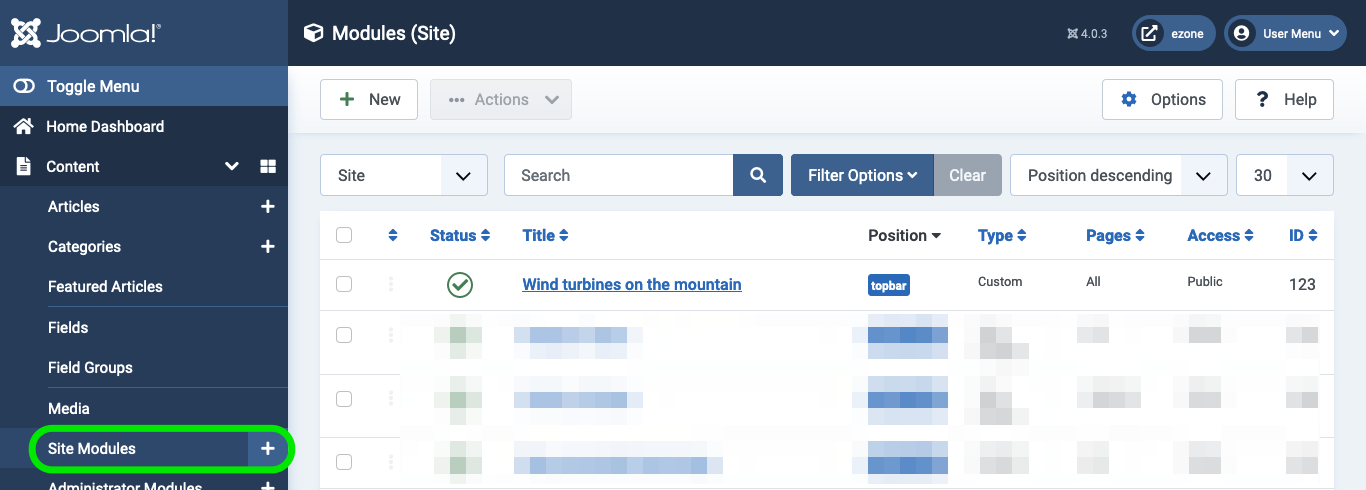
The finished module appears in the Site Modules list in the administration panel. It is a small but effective change — placing the banner in the topbar position rather than the older banner position tends to produce a cleaner result, and Joomla's module assignment and styling controls give you fine-grained control over exactly where and how it appears.
Option 2 — Cassiopeia Themer for visual banner and layout control
If you want more than a single background image — or you find yourself repeatedly editing user.css to tweak colours, fonts, and spacing — Cassiopeia Themer by Multizone Limited is worth a look. It adds a dedicated administration component (com_themer) that writes all customisations directly to media/templates/site/cassiopeia/css/user.css, keeping your changes upgrade-safe and entirely within Joomla's own file structure.
Banner management is one of its core features. The extension provides dedicated banner slots for the header, below-header, and pre-footer positions — so you are not limited to the topbar alone. Beyond banners, it covers palette management (including import from Material Theme Builder JSON files), typography, layout, a WCAG contrast checker graded against AA and AAA thresholds, and injection of scripts such as Google Analytics 4 and Google AdSense auto-ads. For sites running affiliate content, it also handles Amazon affiliate link rewriting per TLD automatically.
Cassiopeia Themer is open-source under the GNU General Public License v3 and is installed through the standard Joomla extensions installer: Extensions > Manage > Install > Upload Package File, using the pkg_themer ZIP. A Standard tier licence is priced at £49 per year and covers up to three domains, with higher tiers available for larger deployments. The extension supports Joomla 5.x and 6.x running PHP 8.1 or later.
Cassiopeia Themer adds admin component com_themer. Settings write to media/templates/site/cassiopeia/css/user.css.
Whether you go with the lightweight Custom module route or the full Themer control panel depends on how much you need to manage. For a single banner on a straightforward site, the built-in approach is perfectly adequate. For a site where you are actively managing branding, accessibility compliance, and marketing integrations, Themer removes a significant amount of repetitive manual work.
