

Joomla remains one of the most capable and widely used content management systems available in 2026, and its default front-end template — Cassiopeia — ships with both Joomla 5 and the recently released Joomla 6. Clean, responsive, and built on modern CSS, Cassiopeia is an excellent starting point. But a starting point is all it is. Most site owners need colours, typography, and layout that reflect their own brand rather than Joomla's defaults. The challenge has always been doing that in a way that survives the next update — and in 2026 there are better tools than ever to make that happen. This article walks through every approach, from hand-rolled CSS overrides to dedicated visual control panels like Cassiopeia Themer, so you can choose the method that suits your workflow.
TL:DR – Customising Cassiopeia's colour theme without losing your work on the next Joomla update takes a deliberate strategy: child-theme overrides, a dedicated user.css file, or a purpose-built extension such as Cassiopeia Themer. Each approach is covered below.
Contents
- Cassiopeia in 2026: what's changed
- Overview of the Cassiopeia template
- Why colour customisation matters
- The core challenge: surviving Joomla updates
- Strategy 1 — The user.css file
- Strategy 2 — Template overrides and child themes
- Strategy 3 — A dedicated extension: Cassiopeia Themer
- Cassiopeia Themer: tiers and pricing
- Preparing for customisation: back up first
- Implementing custom colours: a practical walkthrough
- Using the Template Manager for quick adjustments
- Writing custom CSS in user.css
- Using Cassiopeia Themer for a visual workflow
- Advanced techniques
- CSS custom properties and design tokens
- Page-specific colour classes
- SCSS for larger projects
- Integrating third-party CSS frameworks
- Accessibility and colour: the 2026 baseline
- Testing and troubleshooting
- Cross-browser and cross-device testing
- Common issues and fixes
- Staging environments
- Performance considerations
- Version control for theme files
Cassiopeia in 2026: what's changed
When Cassiopeia was introduced with Joomla 4, the conversation around customisation was to my mind dominated by workarounds — hand-editing core CSS, hoping updates wouldn't wipe your work, or reaching for heavyweight third-party templates. That picture has shifted considerably.
Joomla 5 and Joomla 6 both ship Cassiopeia as the default front-end template, and the ecosystem around it has matured. The template itself supports user-defined styles in a dedicated file — media/templates/site/cassiopeia/css/user.css — which sits outside the files Joomla's updater touches. Extensions built specifically for Cassiopeia now expose a full visual control panel covering palette, typography, layout, banners, and marketing scripts, without requiring you to open a single CSS file manually.
Accessibility expectations have also risen. WCAG 2.2 is now the baseline most clients expect, and tools that grade colour pairs against the AA (4.5:1) and AAA (7:1) contrast thresholds are no longer a luxury — they are part of a responsible theming workflow. If your current approach doesn't include a contrast check, it's worth revisiting.
Overview of the Cassiopeia template
Cassiopeia is a mobile-first, lightweight template built on CSS Grid and Flexbox. Its modular structure makes it straightforward to adapt for blogs, portfolios, and corporate sites alike. Because it is maintained by the Joomla project itself, it benefits from regular security and performance improvements — which is exactly why a naive approach to customisation (editing core files directly) causes so much pain.
The default colour palette leans on neutral tones — white, light grey, and a restrained accent blue. Functional, but rarely on-brand for any specific business. The good news is that Cassiopeia was designed with overriding in mind: the user.css file is loaded after the template's own stylesheets, so any rule you place there wins without needing !important hacks.
Why colour customisation matters
Colour is one of the fastest signals a visitor receives about whether a site belongs to the brand they were expecting. Consistency between your website palette and your other marketing materials builds recognition and trust. Inconsistency — even subtle inconsistency — registers as unprofessional, even when visitors can't articulate why.
Beyond branding, colour choices directly affect usability. Sufficient contrast between text and background is the single most impactful accessibility improvement most sites can make. Colour also guides attention: a well-chosen call-to-action colour draws the eye without shouting, while a poorly chosen one disappears into the page or creates visual noise.
A custom theme that is properly implemented — one that survives updates and can be exported, versioned, and restored — is therefore not a cosmetic luxury. It is part of the site's infrastructure.
The core challenge: surviving Joomla updates
Joomla updates replace core template files. That is by design — it is how security patches and performance improvements reach your site. Any colour change made directly inside those core files will be silently overwritten the next time you update. This is not a bug; it is the expected behaviour of a well-maintained CMS.
The solution is equally straightforward in principle: keep your customisations in files that the updater does not touch. In practice, there are three main strategies for achieving this, each with different trade-offs.
Strategy 1 — The user.css file
Cassiopeia loads media/templates/site/cassiopeia/css/user.css automatically if the file exists. This file is not overwritten by Joomla updates, making it the simplest safe location for custom colour rules. You create the file once, add your CSS, and updates leave it alone.
A minimal example that recolours the primary accent and the navigation background might look like this:
:root {
  --cassiopeia-color-primary: #2e7d32;
  --cassiopeia-color-link:    #1b5e20;
}
.navbar-brand,
.mod-menu {
  background-color: #1b5e20;
  color: #ffffff;
}
Cassiopeia uses CSS custom properties (variables) extensively, so targeting :root variables is often the most efficient way to propagate a colour change across the template. Check the template's main stylesheet for the full list of variables before writing rules element by element.
The limitation of this approach is that it requires comfort with CSS and a text editor. It also offers no visual preview and no built-in contrast checking. For teams or clients who need a more managed workflow, the next two strategies are worth considering.
Strategy 2 — Template overrides and child themes
Joomla's override system allows you to copy any template file into a parallel location under your own template folder. Joomla will use your copy in preference to the original, and updates to the original do not touch your copy. This is the right approach when you need to change layout structure, not just colour values.
For a colour-only customisation, overrides are heavier than necessary — user.css achieves the same result with less maintenance overhead. Where overrides earn their place is when you need to modify PHP template files, change the HTML structure of a module chrome, or inject markup that CSS alone cannot add.
A child theme takes the override concept further by creating an entirely separate template directory that inherits from Cassiopeia. Custom styles, overridden layout files, and any additional assets live in the child theme's folder. The parent template can be updated freely without touching the child. This is the most robust long-term architecture for a heavily customised site, though it requires the most initial setup.
Strategy 3 — A dedicated extension: Cassiopeia Themer
For site owners who want a visual control panel rather than a text editor, our own extention, Cassiopeia Themer by Multizone Limited is the most fully featured option available for Cassiopeia in 2026. It is worth understanding what it does and how it fits into the update-safety picture.
Cassiopeia Themer writes all of its output to media/templates/site/cassiopeia/css/user.css — the same update-safe file described in Strategy 1. That means your palette choices survive Joomla updates regardless of whether you manage them through the extension's interface or by hand. The extension is the editor; user.css is the output.
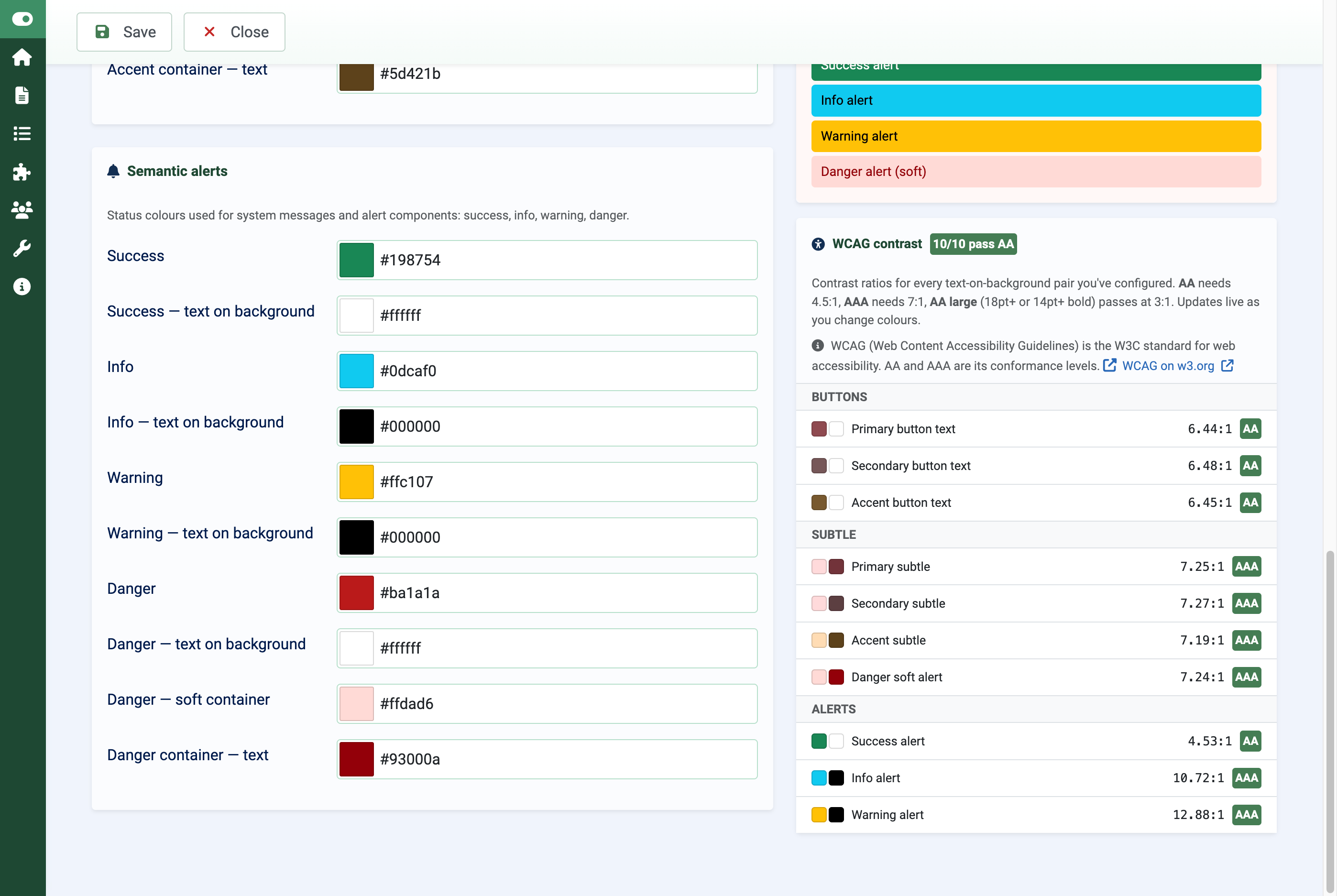
Beyond colour, the extension covers typography, layout, banners, and a suite of marketing integrations including Google Analytics 4, Google AdSense with Consent Mode v2, and Amazon affiliate link rewriting. A built-in WCAG contrast checker grades every colour pair against the AA and AAA thresholds, which removes a manual step from an accessibility-conscious workflow.
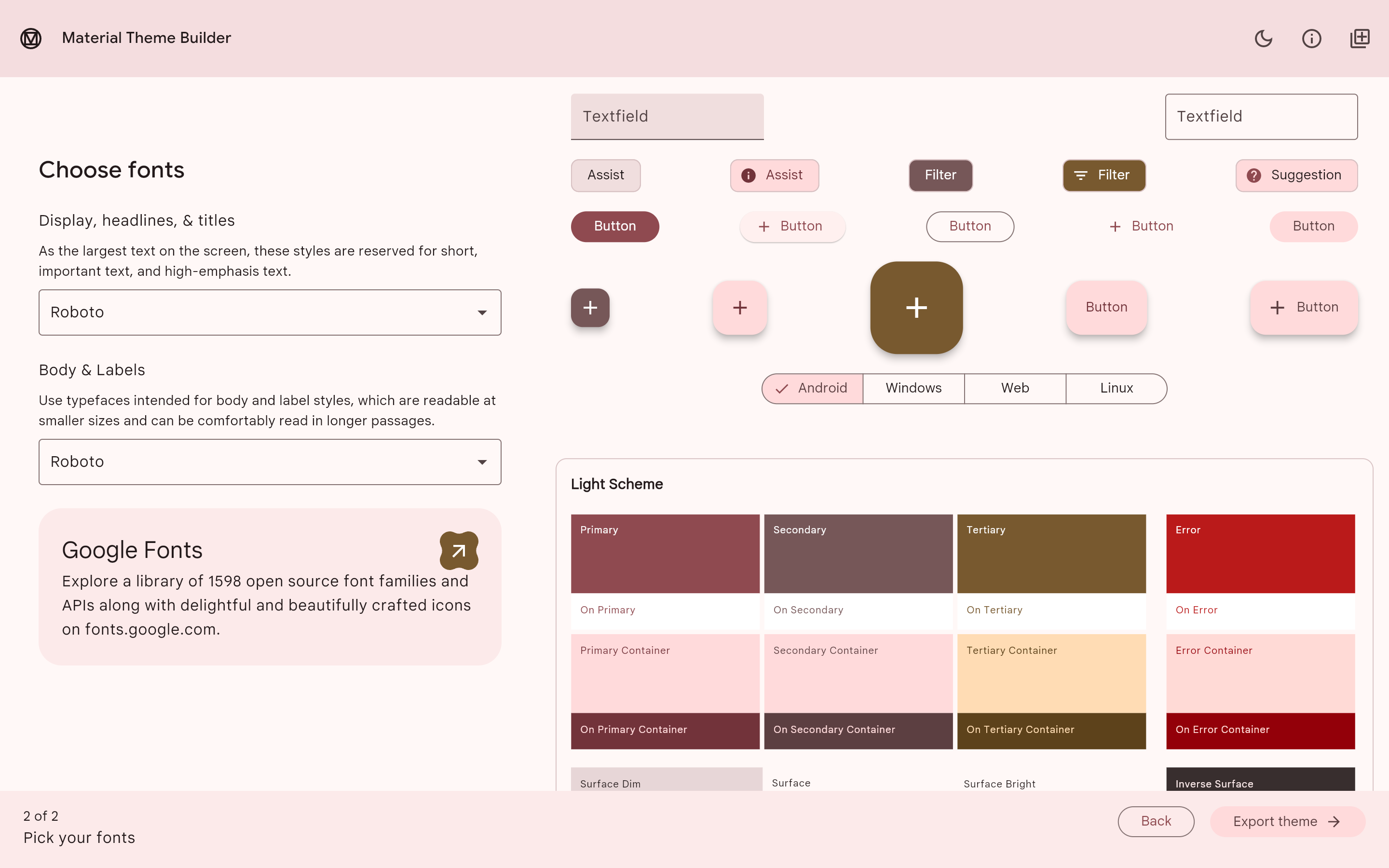
One feature worth highlighting for design teams is Material Theme Builder JSON import. If your brand palette is already defined in a Material Design token file, you can import it directly rather than re-entering hex values by hand.
Cassiopeia Themer: tiers and pricing
Cassiopeia Themer is available in four tiers:
- Trial — free, up to 3 saved palettes, single domain
- Standard — £49/year, up to 10 saved palettes, up to 3 domains, palette export unlocked
- Premium — multiple domains (up to 6), up to 50 saved palettes, AdSense ad units enabled
- Enterprise — unlimited domains, unlimited saved palettes, multiple Cassiopeia template styles, unlimited AdSense units
The extension requires Joomla 5.x or 6.x, PHP 8.1 or later, and MySQL 8.0 or MariaDB 10.4. It is licensed under GPL-3.0-or-later. Installation follows the standard Joomla process: upload the pkg_themer ZIP through Extensions → Manage → Install.
Cassiopeia Themer — a visual control panel for the Cassiopeia template covering palette, typography, layout, banners, and marketing scripts — writes all settings to
user.css, the one stylesheet Joomla updates never touch.
Cassiopeia Themer is available from Multizone Limited > Joomla Extensions and in the Joomla Extension Directory.
Preparing for customisation: back up first
Before changing anything — whether you are hand-editing CSS or installing an extension — back up your site. This means both the file system and the database. Use an extension such as Akeeba Backup. Store the backup somewhere other than on the server itself.
Back up your existing customisation files separately as well. If you are maintaining a hand-crafted user.css, keep a copy in version control or at minimum in cloud storage. If you are using Cassiopeia Themer, use the palette export feature (available from Standard tier upward) to save a copy of your palette definition outside the site.
Implementing custom colours: a practical walkthrough
Using the Template Manager for quick adjustments
Joomla's Template Manager (found under System → Templates → Site Templates in Joomla 5 and 6) provides a basic interface for adjusting template parameters. For Cassiopeia this includes a handful of colour and layout options. It is useful for minor, one-off changes but does not offer the palette management, contrast checking, or export capabilities that a dedicated tool provides.
Changes made through the Template Manager are stored in the template's style record in the database, not in core CSS files, so they do survive updates. However, they are also limited in scope — you cannot adjust every colour in the template through this interface alone.
Writing custom CSS in user.css
For developers comfortable with CSS, editing user.css directly gives complete control. Start by inspecting the live site with your browser's developer tools to identify which CSS custom properties or selectors control the element you want to change. Cassiopeia defines most of its palette through :root variables, so a small number of variable overrides often propagates changes across the entire template.
Keep your rules organised. Group them by component — navigation, headings, buttons, footer — and add short comments explaining intent. A well-commented user.css is much easier to hand over to a colleague or revisit after six months than a flat list of selectors.
Using Cassiopeia Themer for a visual workflow
If you prefer to see changes before committing them, or if you are managing colour themes for clients who need to make their own adjustments, Cassiopeia Themer's visual interface is the more practical choice. The workflow is straightforward: install the extension, open the control panel, build your palette using the colour pickers or by importing a Material Theme Builder JSON file, check each colour pair against the WCAG contrast grades, and save. The extension writes the result to user.css.
The WCAG contrast checker deserves particular mention. Rather than switching between your site and an external tool, the checker is embedded in the palette editor. Each foreground/background combination is graded in real time against the AA and AAA thresholds. For teams that need to demonstrate accessibility compliance to clients, this is a significant time-saver.
Advanced techniques
CSS custom properties and design tokens
Modern CSS custom properties make global colour changes far more maintainable than the old approach of hunting down every hex value in a stylesheet. Define your palette at the :root level and reference those variables throughout. When the brand colour changes — and it will — you update one line rather than fifty.
If your organisation uses a design token system (Material Design, Style Dictionary, or similar), the Material Theme Builder JSON import in Cassiopeia Themer allows you to bring that token file directly into your Joomla site, keeping the website palette in sync with other brand assets without manual re-entry.
Page-specific colour classes
Some sites need different colour treatments for different sections — a warmer palette for a blog, a more formal scheme for a corporate landing page. Joomla allows you to add custom CSS classes to individual menu items, which are then applied to the <body> tag. Combined with scoped CSS rules, this lets you define section-specific overrides without duplicating your entire stylesheet.
SCSS for larger projects
For agencies or developers managing multiple Cassiopeia-based sites, maintaining raw CSS files quickly becomes unwieldy. A CSS preprocessor such as SCSS allows you to define colour variables, nest related rules, and compile a single minified output file. The compiled output drops into user.css as normal; the source SCSS lives in version control alongside the rest of your project files.
SCSS is not required for Cassiopeia customisation, but it pays dividends on any project large enough that a flat CSS file becomes hard to navigate.
Integrating third-party CSS frameworks
Bootstrap is already bundled with Cassiopeia, so adding a second framework is rarely necessary and often counterproductive — conflicting utility classes and duplicate grid systems add weight without adding capability. If you need components that Cassiopeia does not provide, it is usually cleaner to write targeted CSS or use a small component library scoped carefully to avoid conflicts.
Accessibility and colour: the 2026 baseline
WCAG 2.2 is now the widely adopted standard for web accessibility, and colour contrast is one of its most testable criteria. The AA threshold (4.5:1 for normal text, 3:1 for large text) is the minimum most organisations aim for; AAA (7:1) is required for the highest conformance level.
Choosing colours that look attractive on your own monitor is not sufficient. A combination that passes on a high-gamut display in a dim room may fail on a budget phone screen in sunlight. Use a contrast checker — whether built into your tooling (as in Cassiopeia Themer) or a standalone tool — before finalising any palette.
Colour should also never be the sole means of conveying information. Error states, required fields, and status indicators need a secondary cue — an icon, a label, or a pattern — in addition to colour, to remain accessible to users with colour vision deficiencies.
Testing and troubleshooting
Cross-browser and cross-device testing
CSS custom properties are supported across all modern browsers, but rendering differences — particularly in colour management and gamma correction — can make a palette look subtly different across devices. Test on at least Chrome, Firefox, Safari, and Edge, and check on both a desktop monitor and a mobile screen. Browser developer tools make it straightforward to inspect which rules are being applied and whether any are being overridden unexpectedly.
Common issues and fixes
The most frequent problem after a Joomla update is discovering that a custom colour has disappeared. Before investigating further, confirm that user.css still exists and contains your rules — occasionally a misconfigured deployment process will overwrite files it should leave alone. If you are using Cassiopeia Themer, open the control panel and verify that the palette is still saved; re-saving will regenerate user.css from the stored palette data.
Specificity conflicts — where your custom rule is present but overridden by a more specific default rule — are best diagnosed with the browser's developer tools. The Styles panel shows the full cascade and marks overridden declarations with a strikethrough. The fix is usually to make your selector more specific or, as a last resort, to use !important sparingly.
Staging environments
Always test Joomla updates on a staging copy of the site before applying them to production. This is the single most reliable way to catch any conflict between an update and your custom theme before it affects real visitors. Some managed Joomla hosting providers offer one-click staging in 2026; if yours does not, a local development environment serves the same purpose.
Performance considerations
A custom colour scheme adds negligible weight to a page if implemented efficiently. The user.css file for a typical palette override is a few kilobytes at most. Keep it minified for production — remove comments and whitespace — and ensure it is served with appropriate cache headers so returning visitors are not re-downloading it on every page load.
Joomla's built-in cache settings and any CDN you have in front of the site will handle CSS caching automatically, but be aware that after a palette change you may need to purge the cache to ensure visitors see the updated colours rather than a cached version of the old file. Cassiopeia Themer handles this within its own save workflow; if you are editing user.css by hand, purge the cache manually after each change.
Version control for theme files
Treating your user.css (and any SCSS source files) as code — tracked in Git, reviewed before merging, tagged at release — is the most robust approach for any site that matters. Version control gives you a complete history of every colour change, makes it trivial to roll back a change that looked good in staging but caused problems in production, and provides a clear audit trail if multiple people are working on the same site.
At minimum, keep a dated copy of your palette export (from Cassiopeia Themer's export feature, if you are using it) alongside your other site backups. A
