

Joomla remains one of the most capable open-source content management systems available in 2026, powering millions of sites worldwide. But out of the box, it still requires deliberate configuration to perform well in search engine results. The good news is that Joomla's built-in SEO tooling has matured considerably, and with the right settings you can get a long way before reaching for any third-party extensions. This guide walks you through every native adjustment worth making — from server configuration through to canonical links — so you start from a solid foundation.
These settings are spread across different parts of Joomla by design, because not every change applies universally to every site, host, or content structure. That can feel disorienting at first, but once you understand the logic it becomes straightforward to manage.
TL:DR – Rename your htaccess file, configure your site's SEO and metadata settings, audit your menu and article title fields, and enable the System SEF plugin with a canonical domain. Takes about 15 minutes. Read on for the full detail.
Contents
- What's changed for Joomla SEO in 2026
- Apache or LiteSpeed web server htaccess overrides for Joomla
- Force HTTPS across the entire Joomla site
- Search engine friendly Joomla site settings
- Menu and article
<title>settings for Joomla - System SEF plugin — canonical links for Joomla
- Structured data and beyond — where to go next
What's changed for Joomla SEO in 2026
Search engines — Google in particular — have continued shifting emphasis toward page experience signals, structured data, and Core Web Vitals. Joomla 5.x, the current major release branch, ships with improved asset management and leaner default output, which helps with performance scores out of the box. The underlying SEO configuration steps described in this article apply to Joomla 5.x and remain consistent with Joomla 4.x if you haven't yet migrated. If you're still running Joomla 3.x, it reached end of life and you should treat migration as an urgent priority — running unsupported software carries real security and ranking risk.
One meaningful shift worth noting: Google's treatment of the meta description has become even more liberal. It frequently rewrites descriptions using on-page content regardless of what you specify. That doesn't mean you should leave descriptions blank — a well-crafted description still influences click-through rate in results pages — but it does mean the title tag and on-page heading structure carry proportionally more weight than they did when this guidance was first written. Keep that in mind as you work through the settings below.
Apache or LiteSpeed web server htaccess overrides for Joomla
- Check with your hosting provider that your web server configuration permits
htaccessoverrides. Most managed hosting panels enable this by default in 2026, but some hardened or containerised environments disable it — worth confirming before you spend time troubleshooting. - In a freshly installed Joomla site you'll find a file in the root folder called
htaccess.txt. This is Joomla's recommended server configuration file and includes URL rewriting rules that make your site's addresses readable and search-engine-friendly. - Rename it by removing the
.txtextension and adding a leading dot so it reads.htaccess. The file takes effect immediately once renamed.
If your host runs Nginx rather than Apache or LiteSpeed, you'll need to translate the rewrite rules into Nginx server block directives instead. Most managed Nginx hosts that support Joomla will have a configuration snippet available — check their documentation. The Joomla documentation site at docs.joomla.org maintains up-to-date Nginx equivalents.
Force HTTPS across the entire Joomla site
Do this before anything else. HTTPS has been a confirmed ranking signal for years and in 2026 any site serving pages over plain HTTP will face browser warnings that actively deter visitors. Add the following to your .htaccess file, immediately after the RewriteEngine On line:
# Force HTTPS
RewriteCond %{HTTPS} off
RewriteRule ^(.*)$ https://%{HTTP_HOST}%{REQUEST_URI} [L,R=301]
Make sure your SSL certificate is valid and auto-renewing before you add this redirect. Let's Encrypt certificates are free, widely supported by hosting control panels, and renew automatically — there is no reason to run a site without one.
Search engine friendly Joomla site settings
Navigate to System > Global Configuration > Site. The two sections that matter most for SEO are Metadata and Search Engine Optimisation.
- Metadata
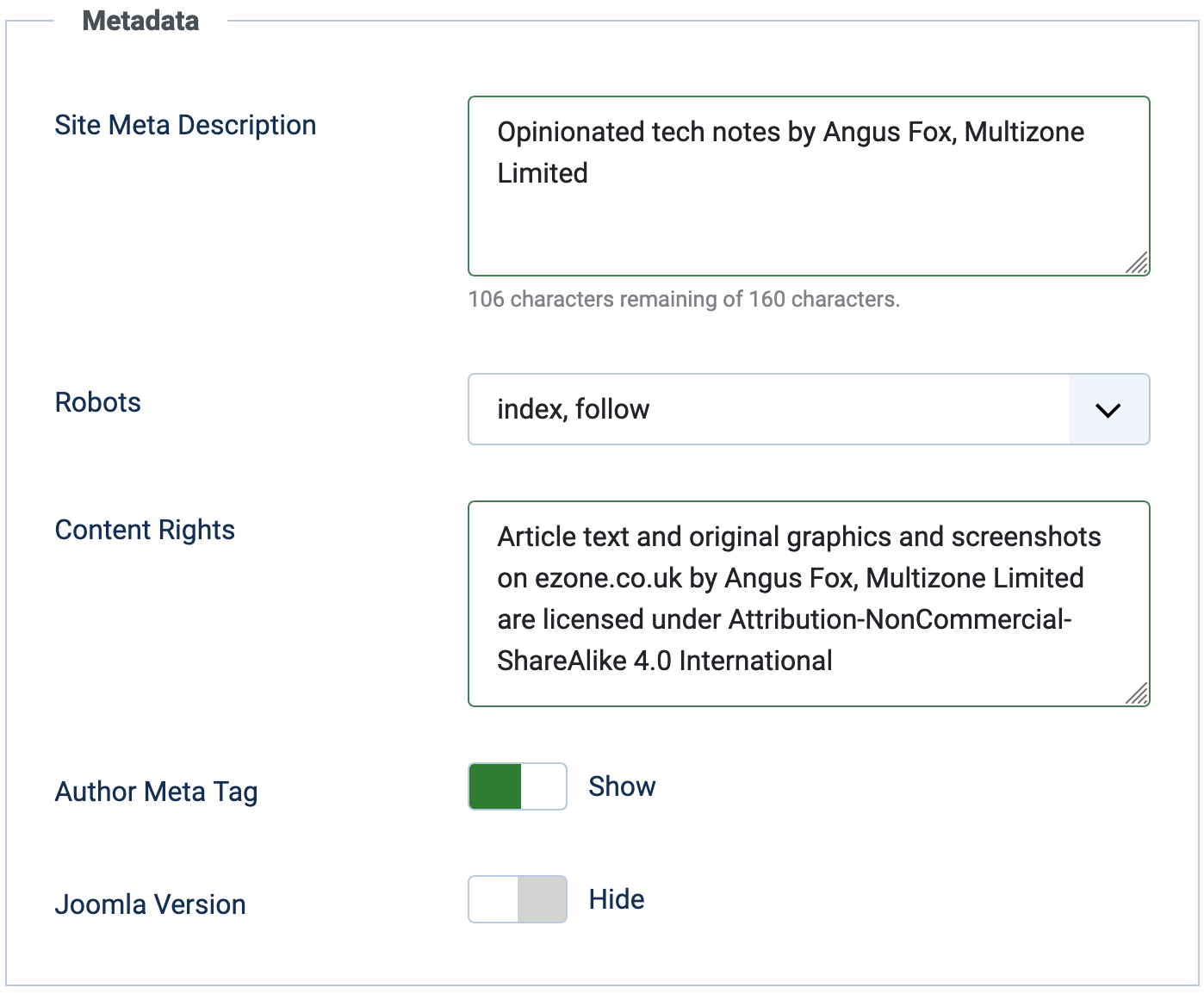
Joomla Global Configuration — Metadata settings - Site Meta Description — Write a concise summary of the site. Joomla applies this as a fallback on any page that lacks its own description. Aim to give every article and category page its own description so this fallback is rarely used.
- Robots — Leave as
index, followunless you have a specific reason to restrict crawling on the global level. Page-level control is better handled per article or via arobots.txtfile. - Content Rights — If your content carries a licence (Creative Commons or otherwise), include it here. It gets written into the source of every page.
- Author — Including this adds a
<meta name="author">tag to each page. Low SEO impact, but useful for attribution. - Joomla Version — Hide this. Exposing your CMS version makes it easier for automated scanners to target known vulnerabilities. There is no SEO benefit to showing it.
- Search Engine Optimisation (SEO)
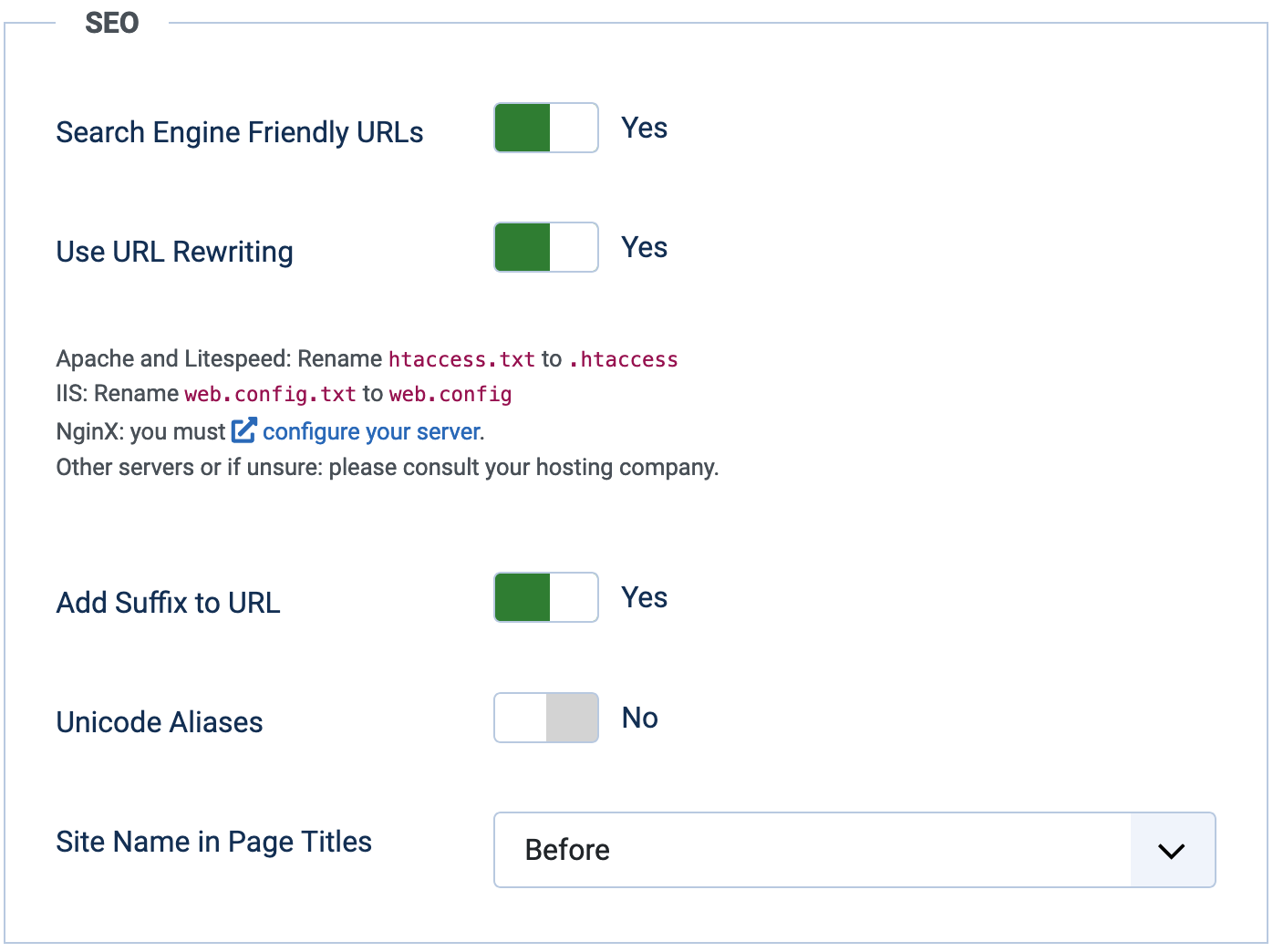
Joomla Global Configuration — SEO settings - Search Engine Friendly URLs — Set to Yes. This converts Joomla's internal query-string URLs into readable path-based URLs.
- Use URL Rewriting — Set to Yes, provided you have renamed your
.htaccessfile as described above. This is what gives you clean URLs likehttps://www.example.com/blog/my-article.htmlrather thanindex.php?option=com_content&view=article&id=42. - Add Suffix to URL — A matter of preference. Adding
.htmlmakes URLs feel more familiar to some audiences and has negligible SEO impact either way. Pick one and stick with it — changing it later requires redirects. - Unicode Aliases — Set to No unless your site publishes primarily in a non-Latin script. For most English-language sites, transliterated ASCII aliases are safer and more widely supported.
- Site Name in Page Titles — Set to Before or After depending on your brand preference. This affects how titles appear in browser tabs and social media cards. The SEO impact is minimal; the branding impact is real.
Menu and article <title> settings for Joomla
The <title> tag remains one of the most direct signals you can give a search engine about a page's topic. Joomla generates it automatically, but the output depends on several settings that are easy to overlook.
The
<title>HTML element defines the document's title that is shown in a browser's title bar or a page's tab. It only contains text; tags within the element are ignored.
The title tag lives in the <head> of the document. Crucially, it is not automatically set to the article title — it depends on your configuration. Here is where to check:
- System > Global Configuration > Site > SEO — Site Name in Page Titles: Set to Before, After, or None. This controls whether your site name is prepended or appended to the page-level title.
- System > Menus > Page Display > Browser Page Title: Leave this blank at the global menu level. If you put text here, every menu item that inherits this setting will use that text as its title tag — almost certainly not what you want.
- Menus > All Menu Items > Page Display > Browser Page Title: Check each individual menu item. Again, leave blank unless you have a deliberate reason to override the title for a specific page.
- Content > Categories > Category > Publishing > Search Engine Title: Leave blank unless you want a category to use a title different from its name. If you leave it blank, Joomla uses the category name — which is usually correct.
- Articles > Article > Publishing > Search Engine Title: Leave blank to use the article title, or enter a custom value if you want the title tag to differ from the visible heading. This is useful when you want a longer, more keyword-rich title tag than the display heading.
Work through these methodically on a new site and you'll avoid the common situation where half your pages share the same generic title tag because a menu-level override was accidentally left populated.
System SEF plugin — canonical links for Joomla
Canonical links tell search engines which URL is the definitive version of a page, preventing duplicate content penalties when the same content is accessible via multiple paths. Joomla handles this through the System SEF plugin rather than a global site setting, because the canonical domain needs to be explicitly declared.
- Go to System > Manage > Plugins and search for System - SEF.
- Open the plugin and enter your site's canonical domain in the Site Domain field — for example
https://www.example.com. Include the protocol and thewwwprefix (or omit it) consistently, matching whichever version you've set as canonical in Google Search Console.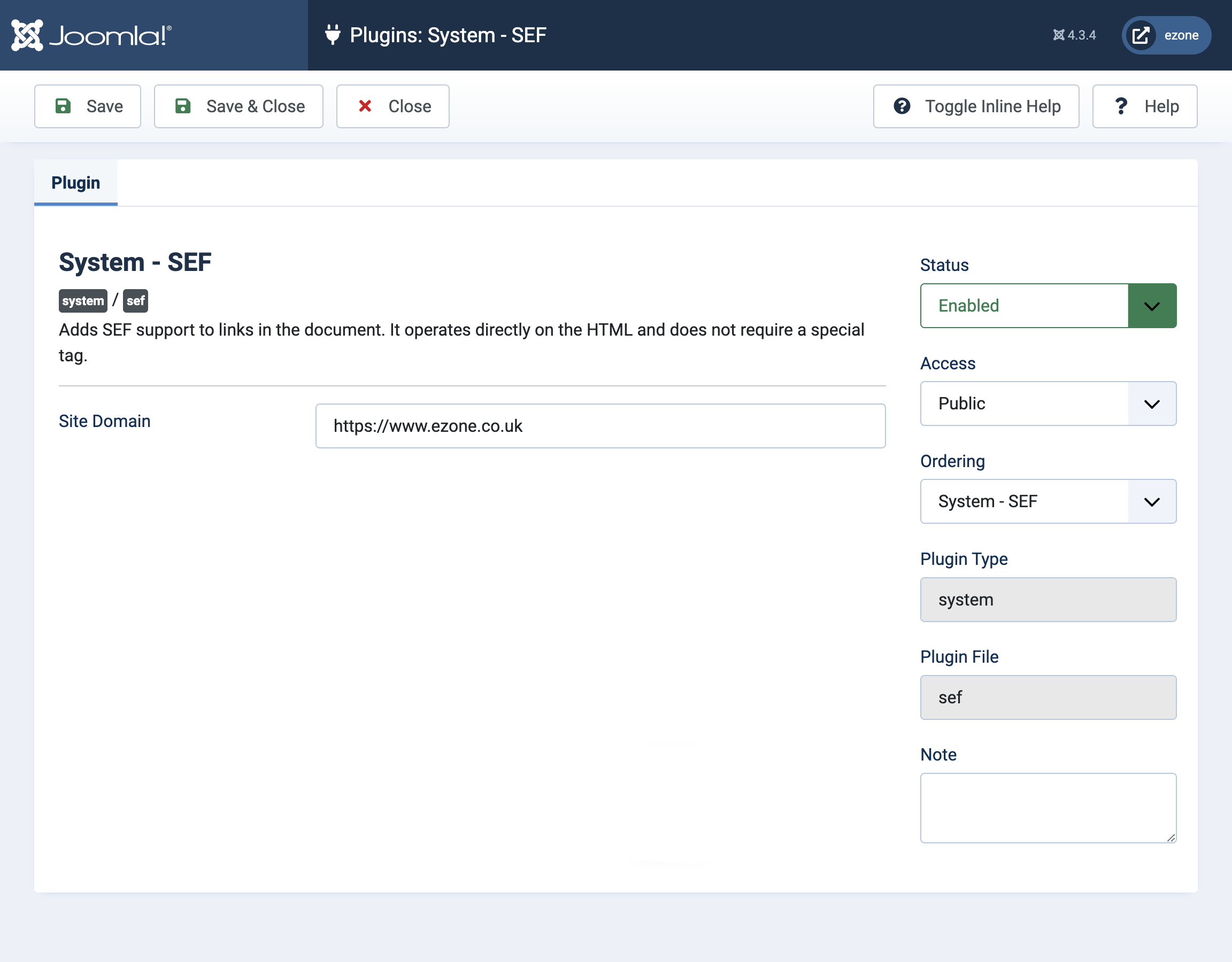
Joomla System SEF plugin — enter your canonical domain here - Set the plugin status to Enabled and save.

Joomla System SEF plugin — enabled
Once enabled, Joomla will output a <link rel="canonical"> tag in the head of every page pointing to the preferred URL. This is especially valuable if your site is accessible via both www and non-www variants, or if category and tag pages can surface the same article under different paths.
Structured data and beyond — where to go next
The steps above cover what Joomla can do natively. Once they're in place, the next meaningful layer is structured data markup — JSON-LD schema that tells search engines explicitly what type of content a page contains (article, product, FAQ, breadcrumb, and so on). Joomla 5.x does not generate structured data automatically, so you'll need a plugin for this. Several well-maintained options exist in the Joomla Extensions Directory; look for ones that are actively updated and compatible with your Joomla version. Structured data won't directly boost rankings, but it enables rich results in search — star ratings, article dates, breadcrumb trails — which meaningfully improve click-through rates.
It's also worth connecting your site to Google Search Console and Bing Webmaster Tools if you haven't already. Both are free, both give you crawl error reports and index coverage data, and both let you submit a sitemap. Joomla's built-in sitemap functionality has improved in the 5.x branch, but dedicated sitemap extensions still offer more granular control over what gets included and how frequently it signals updates to crawlers.
With the native configuration in place, you'll have a clean, crawlable, HTTPS-enforced site with sensible titles, canonical URLs, and no accidental duplicate content from Joomla's internal routing. That's a solid baseline — and for many sites, it's enough.
