Multizone | All our technotes
If we've published it, you can find it here.

Released on 16 May 2022
macOS 12.4 contains enhancements and a huge number, for Apple, of security updates and Apple recommend it for all users of devices that can be updated.

TL:DR— Install macOS 12.4 right away if you can. Important security fixes, enchancements and unspecified bug fixes.
- Details

Installing Flutter on a Mac running macOS Sequoia
Getting Flutter up and running on a Mac with Apple silicon in 2026 — and launching your first macOS desktop app — is faster and more straightforward than ever.

Flutter's macOS desktop target is now mature and fully supported. The hello world example app runs natively on Apple silicon with no workarounds required.
TL;DR — Getting this running takes around a dozen commands, plus some default question-answering and installer clicking for Flutter, Xcode, and Android Studio. Budget about 15 minutes once everything is downloaded. I use a folder called Projects in my home directory, but name it whatever makes sense to you.
{ToC}
What you need before you start
Flutter in 2026 targets macOS, iOS, Android, web, and Windows from a single codebase. On a Mac you will need Xcode for Apple platform builds and Android Studio for Android toolchain management. Both are free. The Flutter SDK itself is also free and open source.
Flutter has matured considerably since its early desktop support days. macOS is now a first-class target alongside mobile, the Impeller rendering engine is the default on Apple platforms delivering noticeably smoother animations, and Dart — Flutter's language — has continued to gain strong typing improvements and faster compilation. If you tried Flutter a few years ago and found the desktop story rough around the edges, it is worth another look.
Xcode
You need Xcode and its command-line tools to build macOS, iOS, and iPadOS apps. Download the latest version from the App Store, launch it once to accept the licence, then check for any additional component downloads it prompts you to install. After that, install the command-line tools from the terminal:
% xcode-select --install
This step takes a while if you are starting from scratch, so it is fair not to count it in the 15-minute budget — you have probably done it already.
Android Studio
Android Studio remains the easiest way to pull in all the Android SDK components Flutter needs, even if you never write a line of Kotlin.
- Download and install the latest release of Android Studio from the Android Developers website. The universal build supports Apple silicon natively.
- Run Android Studio and complete the Setup Wizard. This downloads the Android SDK, SDK Command-line Tools, and SDK Build-Tools that Flutter requires. Do not skip the wizard.
- Open Settings → SDK Manager → SDK Tools and confirm that Android SDK Command-line Tools is checked and installed. It is not selected by default and Flutter will complain if it is missing.
- Note the SDK location shown at the top of SDK Manager — you will need that path shortly.
Flutter
- Download the latest stable Flutter SDK from docs.flutter.dev. Make sure you select the Apple silicon (arm64) zip file. As of the current stable release, Flutter ships as a single archive with no separate Rosetta requirement for standard macOS and Android development.
- Open Terminal and run the following to unpack the SDK, add it to your path, and run an initial health check:
% cd ~/Projects % unzip ~/Downloads/flutter_macos_arm64_stable.zip % export PATH="$PATH:`pwd`/flutter/bin" % flutter config --no-analytics % flutter doctor - Resolve any issues Flutter Doctor flags, then configure the Android toolchain:
% flutter config --android-studio-dir /Applications/Android\ Studio.app % flutter config --android-sdk /Users/YOURUSERNAME/Library/Android/sdk % flutter doctor --android-licenses % flutter config --enable-macos-desktop % flutter doctor - Create and run your first app:
% cd ~/Projects % flutter create hello_world % cd hello_world/ % flutter run -d macos - That's it. You're running a native macOS app built with Flutter.
Step-by-step walkthrough
- Install Android Studio first. It handles the entire Android dependency chain in one pass, which saves significant troubleshooting time later.
- Complete the Android Studio first-run setup wizard fully. Let it download everything, check for updates, and finish before touching Flutter.
- Make Flutter a permanent part of your shell environment by adding the following line to your
~/.zshrc: export PATH="$PATH:/path/to/flutter/bin". Restart your terminal or run source ~/.zshrc for it to take effect. - Opt out of analytics: flutter config --no-analytics
- Point Flutter at Android Studio: flutter config --android-studio-dir /Applications/Android\ Studio.app
- Accept the Android SDK licences: flutter doctor --android-licenses — agree to each one. If this command fails, double-check that Android SDK Command-line Tools is installed in Android Studio's SDK Manager.
- Enable macOS desktop support: flutter config --enable-macos-desktop
- Verify your setup: flutter doctor — fix anything it flags before continuing.
- Navigate to your projects folder: cd ~/Projects
- Scaffold a new app: flutter create hello_world
- Enter the project directory: cd hello_world/
- Run it on macOS: flutter run -d macos
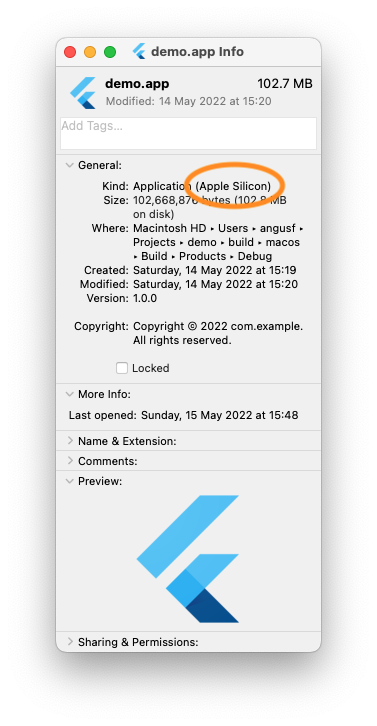
- To confirm the binary is native Apple silicon, open the build output in Finder: open ~/Projects/hello_world/build/macos/Build/Products/Debug then press ⌘I on the app bundle. Application Kind should read Apple Silicon.
Android Studio SDK configuration
- In SDK Manager under SDK Platforms, select the Android API levels you want to target. Current projects typically target API 35 (Android 15) as the compile target while keeping a lower minimum SDK for broader device coverage.

Android Studio SDK Platforms panel. - Under SDK Tools, ensure Android SDK Command-line Tools is checked. It is not installed by default and Flutter's doctor will flag its absence.

Android Studio SDK Tools panel — Command-line Tools must be checked.
A healthy Flutter Doctor output
A clean setup on a modern Mac running macOS Sequoia will look broadly like this — your version numbers will differ, but all major entries should show a checkmark:
% flutter doctor
Doctor summary (to see all details, run flutter doctor -v):
[✓] Flutter (Channel stable, on macOS 15.x darwin-arm64, locale en-GB)
[✓] Android toolchain - develop for Android devices (Android SDK version 35.x)
[✓] Xcode - develop for iOS and macOS (Xcode 16.x)
[✓] Chrome - develop for the web
[✓] Android Studio (version 2024.x)
[✓] Connected device (3 available)
[✓] Network resources

No issues found!
CocoaPods is only required if you are integrating native iOS or macOS plugins. For a pure-Dart or pure-Flutter project it is not needed, and the current Flutter tooling works well with Swift Package Manager as an alternative dependency mechanism for native code.
Flutter devices output
Once macOS desktop is enabled, your Mac itself appears as a run target alongside Chrome and any connected physical devices or running simulators. You no longer need a phone plugged in to iterate quickly.
% flutter devices
3 connected devices:

macOS (desktop) • macos  • darwin-arm64   • macOS 15.x darwin-arm
iPhone 16 Pro (simulator) • ... • ios • com.apple.CoreSimulator ...
Chrome (web)    • chrome • web-javascript • Google Chrome 13x.x
See also
Get the Flutter SDK — Flutter documentation
Mac computers with Apple silicon — Apple Support
Download Android Studio and SDK tools — Android Developers
Impeller rendering engine — Flutter documentation
- Details

In 2026, iCloud for Windows has matured into a genuinely capable bridge between Apple's ecosystem and the Windows desktop — but getting it configured correctly still requires a clear roadmap. This guide covers everything you need to know: downloading and installing the app, signing in, enabling the right services, and keeping things running smoothly. Whether you want to sync photos, browse files in File Explorer, or autofill passwords in your browser, the steps below will get you there.
For the full picture of what Apple's cloud platform offers, the official iCloud page is the best starting point. What follows is a practical walkthrough of setup, day-to-day use, and troubleshooting — written for Windows users who want results without the guesswork.
TL;DR — This article covers downloading, installing, and signing in to iCloud for Windows, plus a feature-by-feature breakdown, settings management, and troubleshooting. Jump to whichever section you need.
- Details

SSL is easy now, no reason to avoid even on development computers
Let’s Encrypt is a nonprofit Certificate Authority providing certificates so that your websites can use secure connections. Certbot is free open source software that allows you to easily create Let’s Encrypt SSL
TL:DR — It takes about five minutes to get SSL configured on Apache on Ubuntu 22.04 LTS.
- Details

Apple iPod Touch 7th Gen (A2178) - RIP
RIP to the final iPod, the iPod9,1 model number A2178. This model lasted from May 2019 - May 2022. In Space Gray, Gold, Silver, Pink, Blue, and even (PRODUCT) RED, with 32, 128, or 256 GB of storage. The only way to get one now is 'renewed' from Amazon or second hand.
TL:DR – RIP iPod October 22, 2001 - May 10, 2022
- Details
Read more: The last of the line iPod Touch 7 has become a cult classic

New Mac, needs a backdoor account
I've always first set up a new mac with a backdoor so that I can get administrator access in case I ever royally screw it up. This has saved me more times than I care to remember.
TL:DR — It takes only a couple of minutes to set up a backdoor administrator account on macOS. Its totally worth it.
- Details

Using sysctl to find the exact processor installed in your Mac
- Details