

Managing a Joomla site in 2026 means keeping up with a constant churn of rebrands, platform changes, and evolving social handles. When a platform you've referenced across dozens of articles changes its name — or when you simply need to scrub an old URL, update a brand name, or swap out a deprecated shortcode — opening every article individually is not a workflow, it's a punishment. There is a far better way.
The answer is DB Replacer, a free extension from Regular Labs that performs a find-and-replace operation directly against your Joomla database. It works across your entire content library in seconds, and it has kept pace with modern Joomla — fully compatible with Joomla 4 and Joomla 5 as of 2026.
TL:DR – DB Replacer finds and replaces any string across multiple database tables and columns in one pass. If you need to update text site-wide without touching each article, this is the tool. Thank you, Regular Labs, for keeping it free and maintained.
Contents
Why you might need this right now
The trigger for writing this was needing to replace an old social media handle across the entire site after deleting the associated account. But the use cases in 2026 are broader than ever: Twitter became X, various AI-tool brand names have shifted, affiliate links get rotated, and product names get revised constantly. Any of those scenarios can leave you with stale text scattered across a content archive that stretches back years. DB Replacer handles all of it.
Regular Labs has also expanded DB Replacer's capabilities beyond simple string matching. The current version supports regular expressions, giving you pattern-based replacements for more complex scenarios — swapping out entire URL structures, for instance, or normalising inconsistent formatting across old posts. If you've never used regex, the plain-text mode works exactly as you'd expect and is perfectly sufficient for most jobs.
How to use DB Replacer
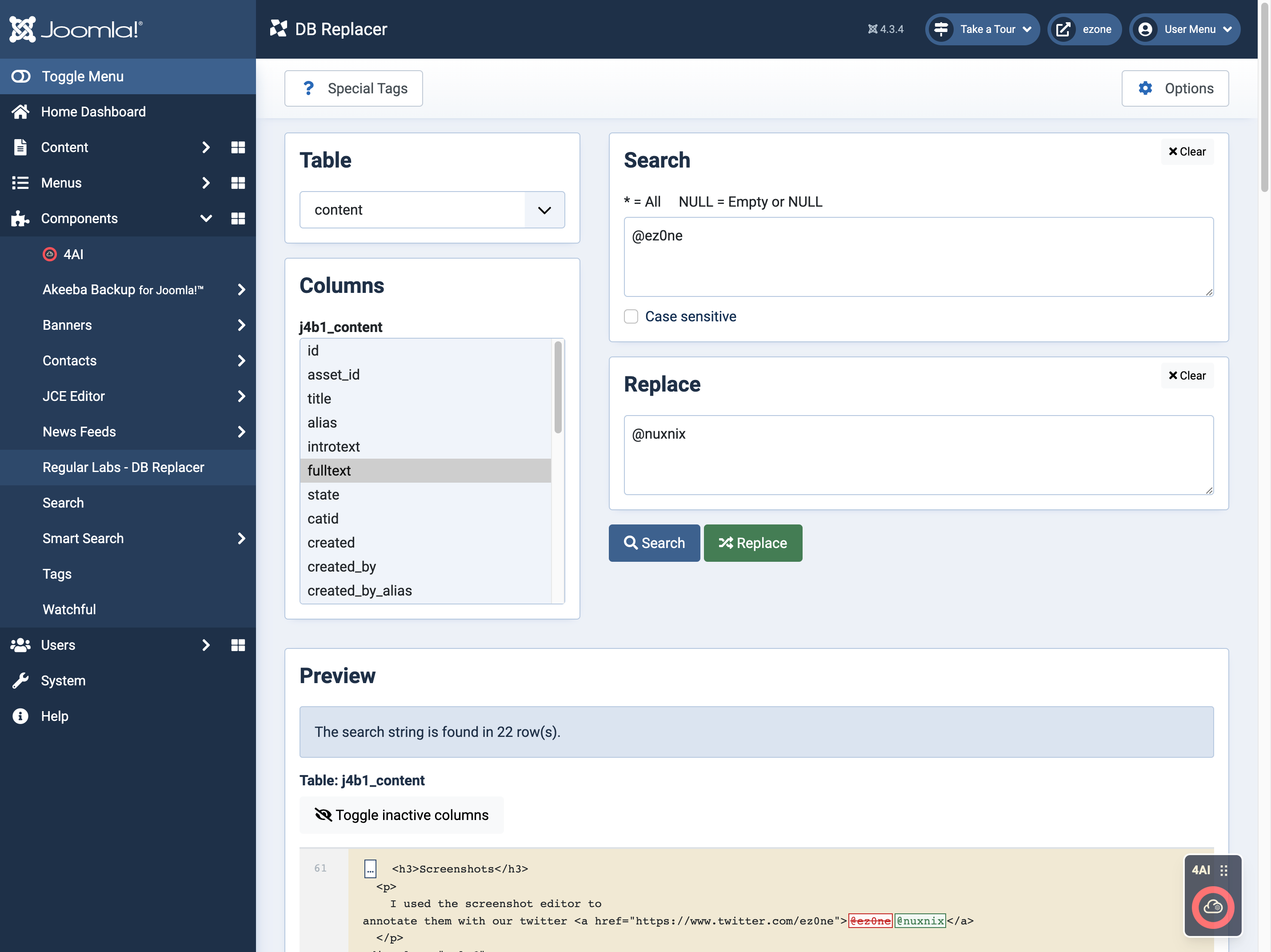
With DB Replacer, the process takes just a few seconds. To replace a string across your database, you need to:
- Go to DB Replacer in your Joomla administrator panel
- Select the database table — typically
#__contentfor articles - Choose the specific column or columns you want to target
- Enter your search string and the replacement text
- Use the Preview function to review every proposed change before committing
- Click Replace when you're satisfied
The preview step is genuinely useful and not just a formality. It shows you exactly which rows will be affected and what the replacement will look like in context. Run it, read it, and only then hit Replace. I ran separate passes for the introtext and fulltext columns in the content table — both needed updating, and doing them independently kept things clean and easy to verify.

A few practical notes for Joomla 5
If you're running Joomla 5, the extension installs and behaves identically to earlier versions — the interface is clean and straightforward within the modern Joomla administrator. One thing worth knowing: Joomla 5 introduced stricter content security policies in some server configurations, but DB Replacer operates entirely server-side against the database, so none of that affects it. It's also worth being aware that Joomla 5 stores some additional content metadata in separate columns compared to older versions, so take a moment to confirm you're targeting the right columns for your use case before running a live replacement.
Regular Labs offers a Pro tier with additional features across their extension suite, but DB Replacer's core functionality — the part that handles find-and-replace across your content — remains free. For the vast majority of site maintenance tasks, the free version is everything you need.
